
Small Business Marketing Calendar: Why You Need One Free
By Ethan Cole and Team, Template Publishing and Productivity Systems Specialists: Small Business Marketing Calendar: Why You Need One Free

The promise of a marketing calendar
Small businesses win on consistency. A marketing calendar turns ideas into a schedule, keeps teams aligned, and makes results measurable. Instead of reacting to slow weeks, you plan campaigns ahead, match messages to seasonality, and track what actually produces revenue. The goal is simple. Plan campaigns. Publish on time. Measure what matters.

What a marketing calendar solves
-
Missed posting days and last-minute scrambles
-
Unclear ownership for content and campaigns
-
Inconsistent brand voice across channels
-
Gaps between product launches and promotions
-
Little to no data on what worked and why
When everything is visible on one page, priorities become obvious. If a week is overloaded, you rebalance. If a campaign is thin, you add supporting posts or an email. If a channel underperforms, you adjust rather than guess.
Anatomy of a useful calendar
A good calendar is not just dates. It is a system with five elements.
-
Channels: Website, email, social, ads, video. Choose the few channels that reach your buyers and commit to a steady cadence.
-
Owners: Name the person responsible for each channel or campaign. Responsibility creates momentum.
-
Deadlines: Use draft, review, and publish dates. Short, predictable cycles beat big launches that slip.
-
Status: Use clear labels. Planned. In progress. Scheduled. Published. Updating.
-
Outcomes: Tie every item to a KPI. Leads. Sales. Revenue. ROAS. CAC. Share of newsletter clicks.

Channel mix that fits a small business
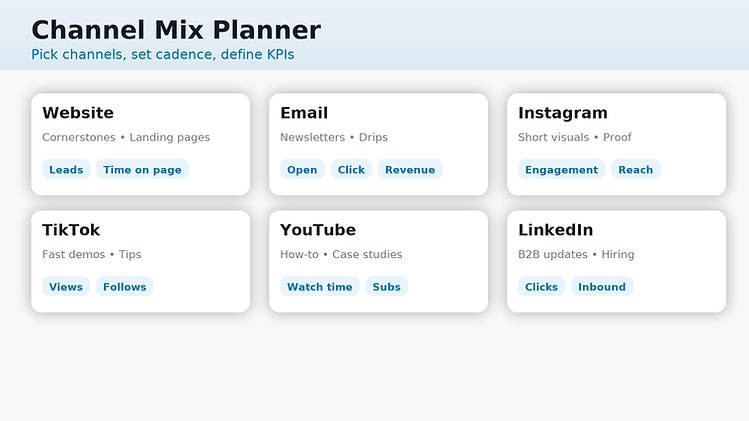
Not every channel deserves equal effort. Start with two or three primary channels and make them excellent. Add more only when the system runs smoothly.
-
Website: Cornerstone articles, landing pages, and lead magnets.
-
Email: Weekly or bi-weekly sends. Product features, education, and clear CTAs.
-
Instagram or TikTok: Short, visual content that shows the product in use.
-
YouTube: How-to videos or short demos that answer buyer questions.
-
LinkedIn: Great for B2B credibility, partner updates, and hiring.
Cadence starter guide
-
Website: 2 posts per month
-
Email: 1 send per week
-
Social: 3 to 5 posts per week
-
Ads: always-on with monthly creative refresh
-
Video: 2 short videos per month
The four-stage campaign timeline

A simple timeline keeps projects moving. Work in short sprints so you ship often.
-
Brief: Goal, audience, offer, channels, budget, success metric.
-
Production: Copy, graphics, video, landing page, tracking.
-
Launch: Publish assets, confirm links, QA on mobile, verify pixels.
-
Optimize: Check performance at 72 hours and at 14 days. Keep what works, refine what does not.
KPIs that matter
Pick a few leading indicators and one or two revenue measures. Track them the same way every week.
-
Leads
-
Cost to acquire a customer
-
Return on ad spend
-
Sales or pipeline value
-
Email click rate
-
Organic search impressions and clicks

Weekly review ritual
-
What changed versus last week
-
What drove the change
-
What gets more budget
-
What gets paused
-
One experiment to run next week
How to build a free marketing calendar in under an hour
You can do this with a spreadsheet. No paid software required.

Step 1: pick quarterly goals
Choose one primary goal and two supporting goals. Examples.
-
Primary: increase qualified leads by 30% this quarter
-
Supporting: grow email list by 2,000 subscribers
-
Supporting: launch two new landing pages
Step 2: map channels to goals
For each goal, pick the channels that move it. Example for lead growth.
-
Website: two guides and one comparison page
-
Email: weekly send with one strong CTA
-
Social: three product proof posts per week
-
Ads: retargeting to the new guides and landing pages
Step 3: set cadences
Add a column for cadence in your sheet. Examples.
-
Blog: first and third Wednesday
-
Email: every Tuesday at 11 a.m.
-
Social: Monday, Wednesday, Friday at noon
-
Ads: refresh top creatives on the first of the month
Step 4: fill a four-week grid
Create a calendar tab with four weeks across and channels down the rows. In each cell, write the asset title and owner. Add draft, review, and publish dates in hidden columns so you can filter by status.
Sample entries
-
Week 1 Blog: “How to Choose the Right Plan” Owner: Maya Publish: 10th
-
Week 1 Email: “Three ways to save” Owner: Jon Publish: 11th
-
Week 1 Social: “Customer story” Owner: Lee Publish: 12th
Step 5: wire up tracking
-
Add UTM tags to every link: source, medium, campaign, content
-
Use a single link format saved in your sheet for copy-paste consistency
-
Confirm analytics shows the campaign name before launch
-
For forms, pass the campaign name into a hidden field
Step 6: run the weekly review
On the same day each week, meet for 20 minutes. Bring one screenshot.
-
The KPI dashboard for the last seven days
-
Wins, misses, next week’s focus
-
One test to run, with a simple hypothesis and a publish date
Your free spreadsheet structure
Create a workbook with three tabs.
1) Calendar Columns: Week, Channel, Asset Title, Owner, Draft Due, Review Due, Publish Date, Status, URL, UTM, Notes
2) Content backlog Columns: Idea, Audience, Offer, Format, Priority, Goal, Notes
3) KPI dashboardColumns: Week Start, Leads, CAC, ROAS, Revenue, Email Clicks, Organic Clicks, Insights
This structure is easy to maintain and trains the team to think in short cycles.
Examples you can model this month
-
Seasonal campaign Two blog posts, a lead magnet, two emails, six social posts, and retargeting ads that point to the lead magnet landing page.
-
Product feature push One comparison page, one tutorial video, three social proof posts, and a customer email with a short walkthrough.
-
Local event support Event page on the website, map embed, two emails to local segments, a three-post social sequence, and a recap post with photos.
Common mistakes and how to avoid them
-
Too many channels at once Start small and ship often. Quality beats volume.
-
No owners Assign a name to every asset. One owner per item.
-
No KPIs Pick a handful and track them the same way every week.
-
One-and-done launches Plan an update cycle. Refresh copy, images, and headlines monthly.
-
Weak offers Add a reason to act now. A guide, a calculator, a checklist, a demo slot, or a trial.
Quick start: copy blocks for your calendar
Campaign names Spring launch, Feature spotlight, Customer story week, Tool comparison, Buyer’s guide
CTAs Get the guide, See pricing, Book a demo, Watch the video, Try it free
Offer types Templates, calculators, checklists, mini-courses, webinars, case studies
Final word
A marketing calendar is not a formality. It is your operating rhythm. Plan the work. Publish on time. Review every week. When you repeat that cycle, revenue becomes more predictable and marketing becomes easier to manage.
Start here with this free, fully editable marketing calendar template in Excel format:
What’s inside
-
Config Set the Month, Year, and Week start (Mon or Sun). Edit master Channels, Statuses, and Owners. These power dropdowns across the workbook.
-
Calendar A dynamic 7×6 month grid that auto-fills dates from Config. Each day shows the date at the top and gives you a notes area.
-
Gray shading for days outside the selected month
-
Weekend highlighting that adapts to your chosen week start
-
Space per day for quick planning and notes
-
-
Schedule A structured table for day-to-day execution.Columns: Date, Channel, Owner, Asset Title, Status, Publish Time, URL, UTM Source, Medium, Campaign, Content, UTM Link
-
Dropdowns for Channel, Owner, and Status (fed from Config)
-
UTM builder auto-creates a tagged link when you paste a URL
-
Conditional formatting by Status to scan progress at a glance
-
-
KPIs Weekly slots for Leads, CAC, ROAS, Revenue, Email Clicks, Organic Clicks with a color scale on Revenue for quick trend reading.
How to use
-
Open Config and set Month, Year, and Week start.
-
Update Channels, Statuses, Owners to match your team.
-
Add items in Schedule with dates and details. The calendar is your visual plan, the schedule is your source of truth.
-
Paste URLs and fill UTM fields to generate tracking links automatically.
-
Enter weekly metrics in KPIs during your review ritual.
Explore More Templates and Printables
by DownloadFreeTemplates.com: The Ultimate Template Library
Thanks for reading our calendar blog article. If you would like more resources, you can browse our full library of templates and printables organized by category, including printable calendars for planning, resume templates for job applications, and worksheets for learning at home or in the classroom. You will also find Excel templates for budgeting, tracking, and organizing projects, along with business tools like invoices, checklists, and everyday forms. When tax season comes around, you can access tax forms and related templates that are easy to open, download, and print.
